/ PRODUCT UPDATES
.
Your downloads.
Updates are included with your purchase. Download when you’re ready, and keep making music with the version that works for your projects.
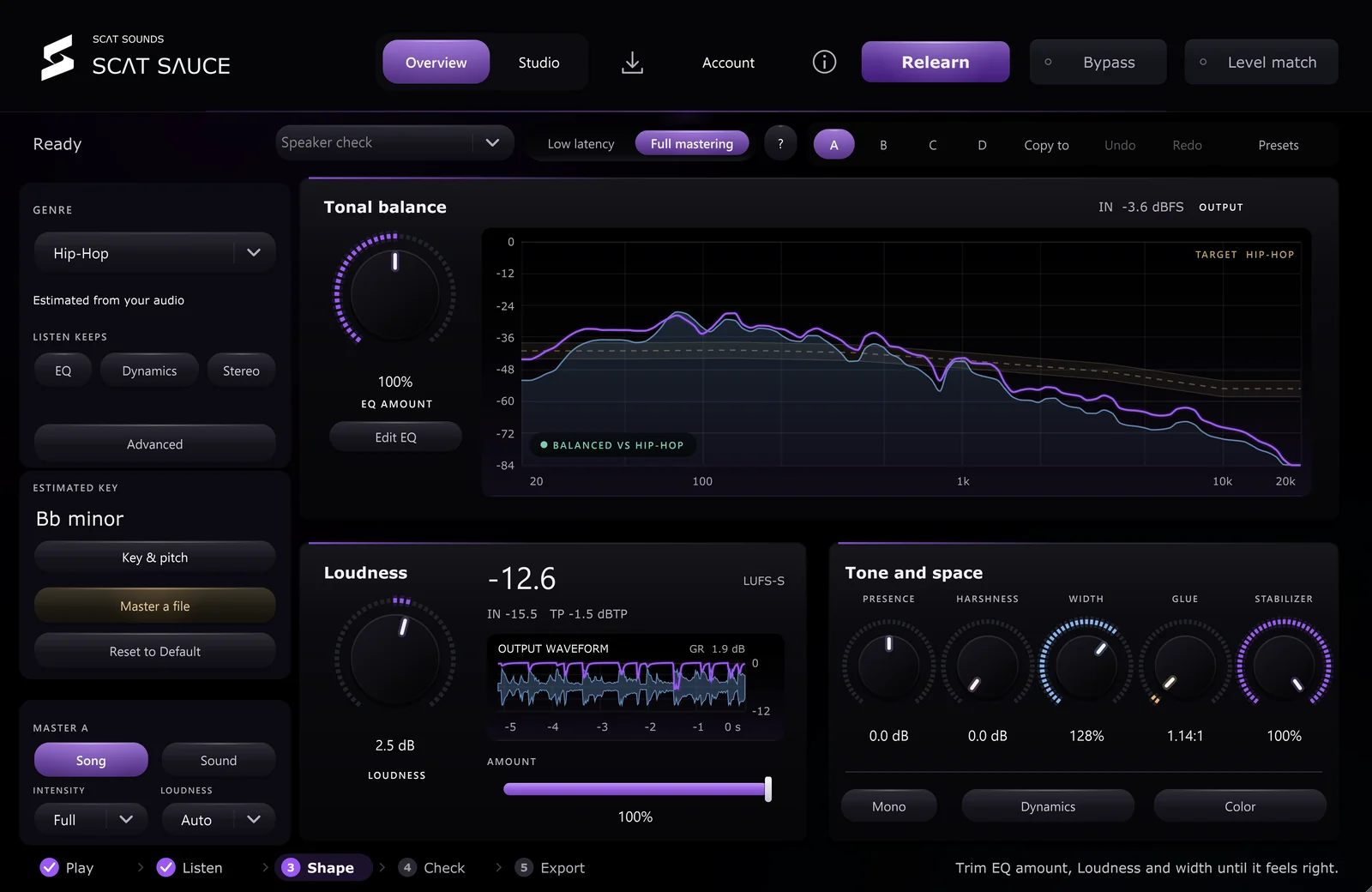
Drop & Master: drop in an audio file and SCAT Sauce sets the whole mastering chain for you.
- Drop & Master: drop an audio file, or a one-shot or sample, on the right half of the Overview, or press Master a file. SCAT Sauce analyzes it on your computer and sets the whole chain in one step, with no playback or Listen pass.
- Master a Song or Sound: full songs get the whole mastering chain at target loudness; one-shots and samples get polished without a loudness push.
- Play, pause and stop the dropped file inside SCAT Sauce and press Bypass to compare the original with the master, no DAW playback needed.
- Export mastered renders the full chain (limiter, punch, imager, multiband glue, transient punch and tape color) to a 24-bit WAV next to your original.
- Listen is now one step, with no window length to choose.
- A redesigned interface: solid pill controls, brighter colors and new sliders.
- The left half of the Overview still compares against a reference, as before.
- Every control shows the value being applied, and everything stays editable by hand.
- Dynamics 2: a second compressor at the start of the chain, off by default.
- Reference loops: set a start and end on a reference track and loop it. Loops at the very start or end of a file play cleanly, Revert keeps the loop, and choosing another reference clears it.
- Listen always lands its result, even if a control moves while it is working. It switches Dynamics 2 off and keeps your Dynamics 2 settings.
- Edited and Revert appear after you change a Listen result, and both survive saving and reopening the project.
- Using Delta or Solo during a delivery pass shows as Audition used in the delivery report.
- Linear-phase Dynamic EQ now renders the Proportional Q, Baxandall and Flat top band shapes. Sessions already using linear phase with one of those shapes will sound different from earlier 3.0.0 builds.
- Host automation on a control that Listen writes overwrites the landed value, and Bypass switched on during Listen is cleared when the result lands.
- Solid flat panels and a full layout polish pass across every module.
- Color focus and tone settings now apply the moment playback restarts, with no half-second glide.
- From this build on, SCAT Sauce is licensed under the SCAT Sauce license agreement. Earlier builds keep the terms they were released under.
- Windows x64 VST3 update included with existing purchases, code-signed by Jacob Merritt.
Save a separate project copy and keep your previous installer before updating.
Update on your schedule.
- Save your work. Save a separate copy of an important project and keep your previous installer before updating.
- Close your DAW. Download the Windows or Mac installer from the account used for your purchase, then run it over the existing installation with your DAW closed. You do not need to uninstall first.
- Rescan and check. Reopen your DAW, run a verified plugin scan if needed, and check a saved project before continuing your session.
There’s no second purchase and no automatic installation during a session. Open the setup guide ↗
Check your update.
The plugin displays 3.0.0. Overview keeps the automatic Listen workflow. Studio opens direct EQ, Multiband, Dynamics, Stereo, Colour, Output, Reference and Meters controls. Both workspaces edit the same processor. Opening a module leaves your settings alone. An existing instance stays loaded until your DAW closes.
- Confirm the version. Close your DAW before running the installer. Reopen it, rescan if needed, and load a fresh instance. If the version is still older, check for a duplicate installation before removing any files.
- Hear the result. Play a representative section, press Listen and let the capture finish. When analysis finishes, Overview opens with the applied settings. EQ, dynamics, stereo and maximizer controls remain editable.
- Compare the finish. No report or manual adjustment is needed to apply the result. Use Bypass and Level match to compare. You can change the controls afterward; turn audition controls off before a real-time recording or export.
Automatic mode analyzes your playing mix and selects an estimated genre in the main left panel. You can choose a genre to guide a new pass, then use Relearn. Open Studio → Reference to import a comparison. Guide next Listen separately selects that file as the analysis target. Something still sounds unchanged? ↗
Know what’s available.
Compatible with FL Studio, Ableton Live, Cubase, REAPER, and Bitwig Studio on Windows. The Windows installer is code-signed by Jacob Merritt. Check the file and installation guidance before running it.
Windows available now. Mac beta v3.0.0 includes AU and VST3 for Apple Silicon and Intel. Mac beta details ↗
uses account activation. Choose “Activate this computer” in the plugin, then approve it with the account that owns your purchase.
Keep the choice yours.
Want an email when a new plugin version is ready, with a download link and instructions for updating, plus new releases and exclusive offers? Choose your preference in your account. It’s optional, and you can turn it off whenever you like.
Email preferences ↗